
What is Wrap terminal
Ship faster in a modern terminal designed to help you go from prompt to production. Display terminal sessions as vertical tabs and configure metadata like git branch, worktrees, and pull-requests.
The Architecture: An Engine Built for Cloud and AI Scale
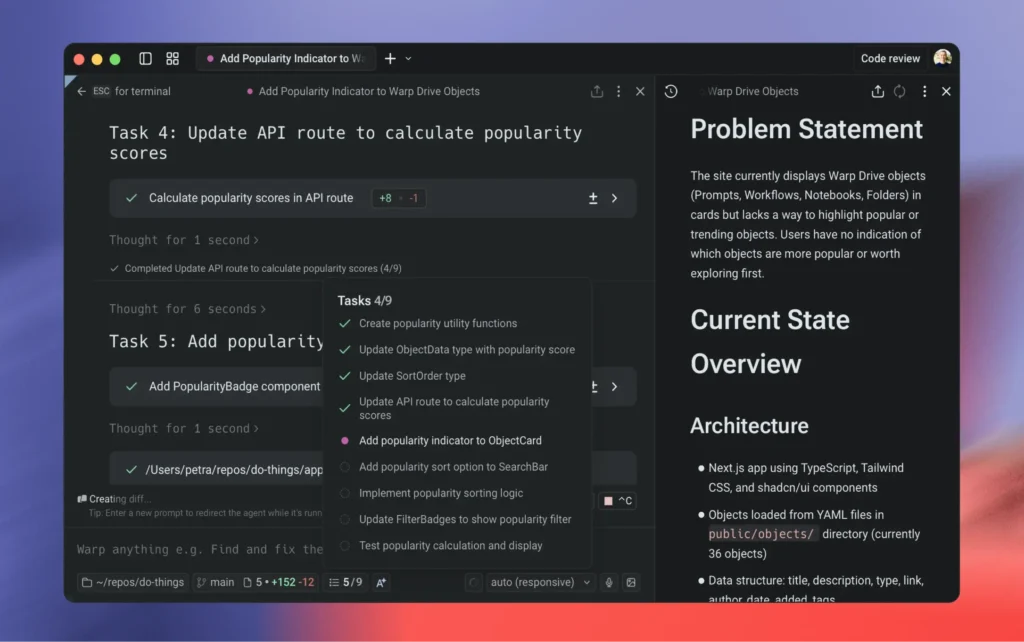
Warp completely disrupts traditional terminal structures by treating the command line as an interactive, IDE-style application rather than a simple stream of text characters. Beneath its visual interface, Warp is built natively in Rust and splits its environment into a high-performance rendering client and a powerful background orchestration engine named Oz.
                ┌──────────────────────────────────────┐
                │          Warp Client Core            │
                │     (Rust Editor & UI Blocks)        │
                └──────────────────┬───────────────────┘
                                   │
         ┌─────────────────────────┴─────────────────────────┐
         ▼                                                   ▼
┌──────────────────┐                                ┌──────────────────┐
│   Local Agents   │                                │   Cloud Agents   │
│ (Interactive IDE │ ◄────────────────────────────► │ (Background Runs,│
│  LSP / Context)  │      (Seamless Handoff)        │ CI/Webhook Hooks)│
└──────────────────┘                                └──────────────────┘
This dual-layer framework fundamentally changes terminal operations:
- The Blocks Paradigm: Instead of an endless scroll of flat text, Warp groups every individual command and its resulting output into an isolated graphic element called a “Block.” Blocks can be navigated like an editor, bookmarked, or securely shared with team members via cloud URLs.
- Agent Handoff Capabilities: Through the Oz platform, you can initiate a task interactively via a local agent, step away, and hand it off to a persistent Cloud Agent that finishes execution in the background while monitoring webhooks or Slack alerts.
Platform-Specific Focus: Pure Cross-Platform Parity
Warp delivers a unified visual workspace running identically across macOS, Linux, and Windows (10/11), achieving massive feature parity by sharing nearly 98% of its underlying codebase across all three operating systems.
- Custom Graphics Framework: Bypassing operating system UI kits completely, Warp renders its rich graphical layout, menus, and syntax highlighting directly via specialized GPU pipelines (Vulkan on Linux, Metal on Mac, and DirectX on Windows).
- IDE-Style Text Inputs: The command line input prompt operates like a modern text editor rather than a standard shell prompt. It features full text-selection controls, multi-cursor editing, and drag-and-drop file paths right out of the box.
- Ecosystem Bridging: On Windows, it handles native integrations with PowerShell, Command Prompt, and WSL environments smoothly, while on Linux it supports both X11 and modern Wayland display servers natively.
Deep Technical Integration & Features
Warp repositions the terminal from a basic utility into an AI command center, building advanced code completion frameworks and team intelligence protocols right into the interface.
The AI Agent & MCP Workspace
Rather than forcing you to jump back and forth between your editor and a browser AI chat, Warp embeds multi-model AI workflows directly into your shell. It supports Model Context Protocol (MCP) server integration, letting you plug in tailored local context data, project rules (AGENTS.md), and system file trees to steer your tools intelligently.
Feature Matrix
| Feature Domain | Capabilities | Highlighted Workflows |
| Agentic AI & Prompting | Deep AI toolbelts featuring multi-model connectivity. | Native support for Anthropic, OpenAI, and Google models. Features an Active AI loop that previews next-step commands based on your prompt, execution errors, or exit codes. |
| Collaborative Drive | A shared cloud workspace called Warp Drive. | Allows dev teams to save, parameterize, and version-control common internal commands, notebook runbooks, and secure environment variables in a shared layout. |
| Input Intelligence | Built-in text assistance and parsing. | Includes full Language Server Protocol (LSP) handling, multi-line syntax completions, auto-correcting command typos, and native rich markdown formatting. |
Behind the Code: Commercial Open-Source Roots
Originally launched in 2020 by Zach Lloyd (former Google Principal Engineer), Warp evolved as a venture-backed tool designed to revitalize the decades-old terminal pipeline.
The software operates under a highly modern open-source model: the client editor and its underlying core engine are public on GitHub under dual MIT and AGPLv3 licenses, while specialized team features and large cloud-coordination tools run on paid cloud credit extensions. It stands as a powerful hybrid solution built for developers who want the velocity of an open-source tool paired with corporate-grade AI automation and compliance rules like zero data retention.